








.jpg)
In today’s digital marketplace, your email address is often your first handshake with a potential client. Understanding how to create a business Gmail account is essential for any entrepreneur looking to move beyond generic addresses and establish true brand authority. By transitioning to a professional Google Workspace setup, you gain more than just a custom domain; you unlock advanced security features and collaborative tools that keep your operations running smoothly. This guide simplifies the process so you can focus on growing your business.
1. Why You Need a Professional Email Account
This guide explains how to create a business gmail account to elevate your brand’s credibility.
1.1. Build Professional Credibility
Using a custom domain (like name@yourcompany.com) instead of a generic provider shows clients you are a legitimate, established professional. It creates a strong first impression and ensures that your business communications are taken seriously by partners and customers alike.
1.2. Access Advanced Security Features
Business accounts offer robust administrative controls and enhanced security protocols that personal accounts lack. You can manage user access, implement two-factor authentication across your team, and utilize advanced spam filters to keep your sensitive company data and client information protected.
1.3. Integrated Productivity Tools
A professional account often comes with a suite of integrated tools designed for collaboration, such as shared calendars, professional video conferencing, and larger cloud storage. These features streamline your workflow, allowing you to manage projects and communicate with your team more efficiently from one central hub.
2. How to Create a Business Gmail Account (Google Workspace Step-by-Step)
Learning how to create a business gmail account using Google Workspace establishes a professional, custom email address (you@yourbusiness.com) to improve brand credibility, offering secure cloud storage, calendar tools, and 24/7 support.
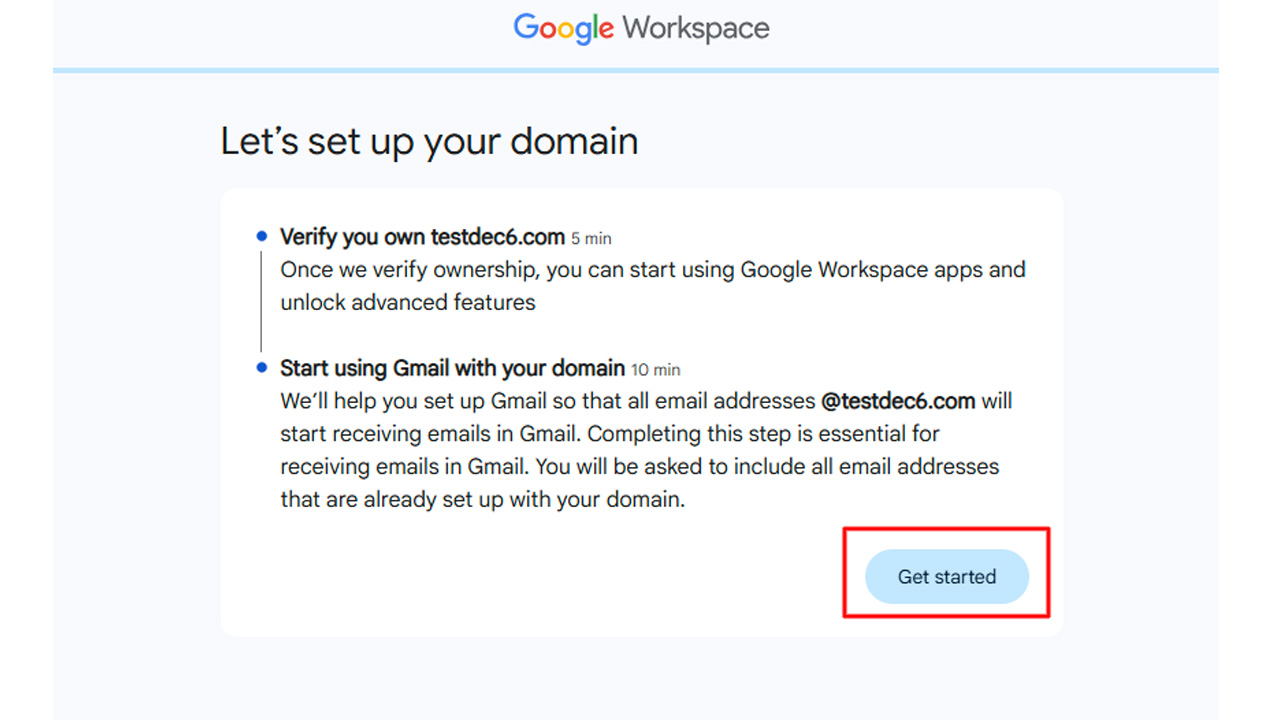
2.1 Step 1: Sign Up for Google Workspace
Visit the Google Workspace website and click "Get Started" to initiate the setup. Enter your business name, number of employees, and location. You will need to provide your current personal email address and create a username and password for your new administrative account.
2.2 Step 2: Connect or Buy a Domain Name
During sign-up, select "Yes, I have one that I can use" if you already own a domain (e.g., yourcompany.com). If not, select "No, I need one" to purchase a new domain directly through Google. A custom domain is required for professional business Gmail.
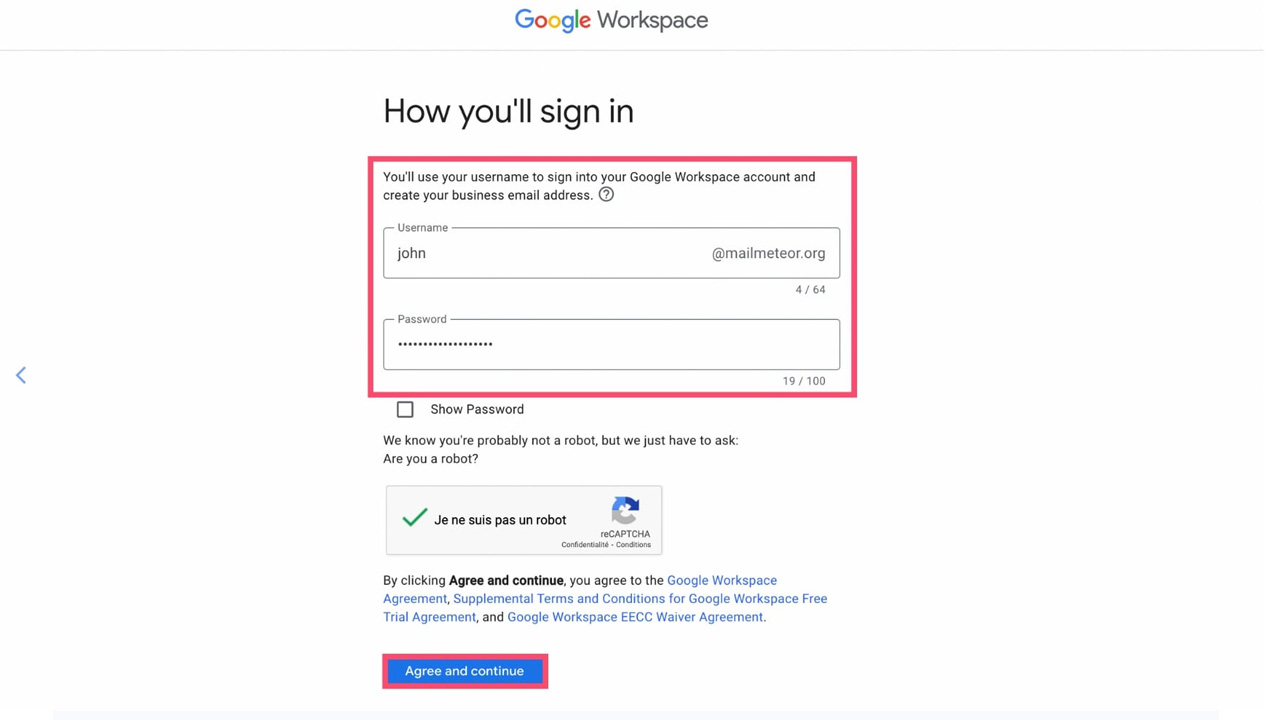
2.3 Step 3: Create Your Business Email Address
Create your first user account by entering a username (e.g., name@yourcompany.com) and a password. This acts as your primary email account. You can also add email aliases for free, such as support@yourcompany.com or sales@yourcompany.com, which direct to your main inbox.
2.4 Step 4: Verify Your Domain Ownership
To protect your domain, you must verify that you own it within the setup wizard. Google provides a unique verification code that you add to your domain settings, usually through your domain registrar like GoDaddy or Namecheap.
2.5 Step 5: Configure MX Records to Activate Gmail
To receive emails, you must update your domain's MX (Mail Exchange) records to point to Google’s servers. Access your domain host's DNS settings, delete existing MX records, and add the new records provided by Google Workspace, allowing up to 48 hours for propagation.
2.6 Step 6: Finalize Setup and Add Users
Set up billing, add your company logo for branding, and configure two-factor authentication (2FA) for security. You can add more users for team members through the Admin console and set up their specific email accounts.
>>> Need a pre-verified business email account immediately? Check out secure options on the MegaAcc Gmail category page.
3. How to Make a Business Email Account Stand Out (Best Practices)
Creating a professional presence starts with knowing how to create a work email that commands respect. Use these best practices to build credibility and ensure your messages always get opened.
3.1 Use a Custom Domain
Ditch generic providers like Gmail or Yahoo for a domain that matches your business name (e.g., name@yourbrand.com). A custom domain immediately establishes you as a legitimate professional and makes your brand more memorable to clients and partners.
3.2 Keep the Username Simple
Stick to standard formats like "First.Last" or "FirstInitialLast" to remain easily searchable. Avoid using nicknames, excessive numbers, or quirky handles, as these can look unprofessional and may even cause your emails to be flagged as spam by corporate filters.
3.3 Design a Clean Signature
Your email signature should act as a digital business card without being cluttered. Include your full name, job title, and a link to your website, but keep the colors minimal and avoid oversized images that might not load correctly on mobile devices.
3.4 Prioritize Security Settings
A standout business email is a secure one. Enable two-factor authentication (2FA) and set up SPF, DKIM, and DMARC records on your domain to prevent spoofing. This ensures your recipients' mail servers trust your identity, keeping your communication out of the junk folder.
4. Looking for Reliable Accounts? Buy From MegaAcc
MegaAcc is a leading provider of premium, verified digital assets designed for entrepreneurs and scale-ups. We specialize in providing aged, high-authority accounts that bypass typical “new account” restrictions. When you choose our brand, you invest in reliability and immediate accessibility for your business operations, along with guidance on how to make a professional email account to strengthen your brand presence.
4.1 Our Feature Product: Aged Gmail Accounts
Our flagship offering includes bulk and individual Gmail accounts that are fully phone-verified and PVAs (Phone Verified Accounts). These accounts come with established histories, making them perfect for marketing campaigns, Google Workspace integration, and secure business communications. Each account is created using unique IPs to ensure maximum security and longevity.
Key Product Features
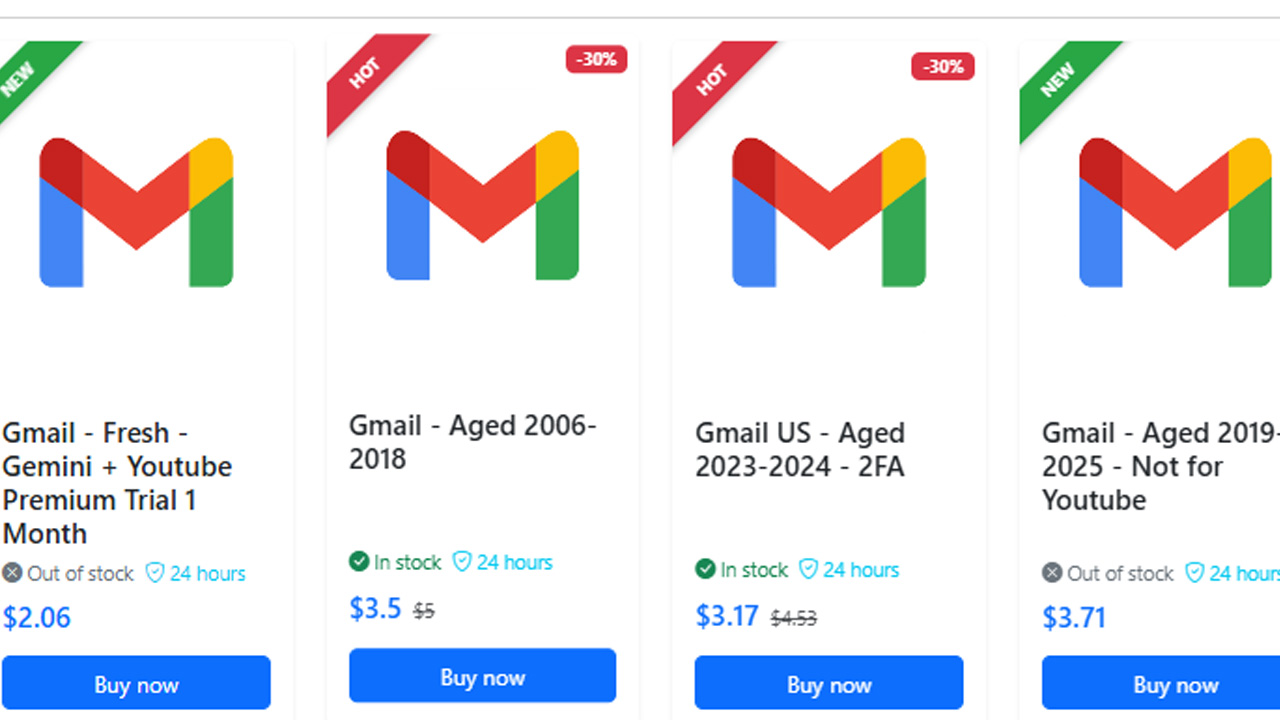
The available products are categorized by age, region, and security configurations:
- Aged Authority (2006–2018): These accounts, such as the Gmail Aged 2006–2018, are established "legacy assets" that carry high trust scores with Google's algorithms. They are less likely to be flagged for suspicious activity, making them ideal for high-stakes marketing campaigns.
- Enhanced Security (US 2023–2024 2FA): The US Gmail 2FA series includes pre-configured Two-Factor Authentication to prevent unauthorized access and ensure account longevity.
- Regional Specifics (US Aged 200x): Products like the Gmail US Aged 200x provide geographically targeted history, useful for businesses needing a US-based digital footprint for local SEO or localized service integrations.
- Targeted Usage (Aged 2019–2025): The Aged 2019–2025 (Not for YouTube) line is optimized for standard business communications and workspace integrations while being explicitly excluded from YouTube-specific automation to maintain account health.
4.2 Seamless Integration and Security
Every account provided by MegaAcc is optimized for immediate use. We prioritize security features like recovery emails and two-factor authentication readiness, ensuring that your transition to a professional setup is seamless. Whether you need one account or one hundred, our products are built to withstand the rigors of heavy professional use.
4.3 Instant Scalability for Your Brand
Growing your business shouldn't be slowed down by account creation limits or verification hurdles. By leveraging MegaAcc’s inventory, you can scale your outreach instantly. Our accounts provide the "warm-up" history needed to ensure your professional emails land exactly where they belong: the recipient's inbox.
Ready to upgrade your professional image? [Buy your verified Gmail accounts from MegaAcc today] and start communicating with confidence!
5. Common Challenges When You Get a Business Email Account
While learning how to create work email id credentials is a vital step for any professional, the process often brings technical hurdles. Understanding these common obstacles helps you maintain a seamless workflow.
5.1 Managing Technical Setup Complexity
Configuring DNS records like MX, SPF, and DKIM can be intimidating for those without a technical background. Failing to set these up correctly can result in your emails being rejected by major providers or failing to deliver entirely.
5.2 Handling Rising Subscription Costs
As your team grows, the monthly per-user fees for premium platforms like Google Workspace or Microsoft 365 can become a significant expense. Small businesses must carefully budget for these recurring costs to ensure their communication infrastructure remains sustainable.
5.3 Combating Spam and Security Threats
Business accounts are frequent targets for phishing attacks and high volumes of unsolicited junk mail. When learning how to open a business email account, it’s important to prioritize robust filtering and strict security protocols to prevent your inbox from becoming overwhelmed, protect sensitive data, and stay focused on important client communications.
5.4 Ensuring Brand Consistency
Maintaining a uniform format across the entire organization can be difficult as new employees join. Without a clear policy on usernames and signatures, your company’s external image can appear fragmented and unprofessional to your clients.
>>> Explore our Gmail Account Category to find the perfect fit for your business, or Log In to your MegaAcc Dashboard to manage your recent purchases.
Frequently Asked Questions on How to Create a Business Gmail Account
Can I use my existing personal Gmail account as a business account?
While you can use a personal account for business, it lacks the professional branding of a custom domain (e.g., @yourcompany.com). To truly elevate your brand, it is better to learn how to create a work email via Google Workspace, which provides administrative control and enhanced security features that personal accounts do not offer.
How long does it take for my new business email to start working?
Once you have configured your MX records, it typically takes anywhere from a few minutes to 48 hours for the changes to propagate across the internet. During this time, you may experience a slight delay in receiving messages, but once finalized, your professional Gmail will be fully operational.
Do I need to buy a domain name separately?
Not necessarily. During the Google Workspace signup process, you have the option to purchase a domain directly through Google. If you already own one from a provider like GoDaddy or Namecheap, you can simply connect it by verifying ownership and updating your DNS settings.
What is the difference between an email alias and a user account?
A user account is a paid seat for a specific person (e.g., john@company.com). An alias is a free, additional address (e.g., info@company.com) that forwards mail to an existing user's inbox. Using aliases is a cost-effective way to manage different departments without paying for extra licenses.
Conclusion
Mastering how to create a business Gmail account is a foundational step in digitizing your brand. By following this step-by-step guide, you ensure that every message you send reinforces your professional identity and remains secure. Whether you are setting up a single inbox or scaling a large team, a custom email address is the key to building lasting client trust. Start your professional journey today and communicate with confidence!
________________________
Quick Access
- Sign In: https://megaacc.com/Identity/Account/Login
- Register: https://megaacc.com/Identity/Account/Register
- Product Categories: https://megaacc.com/
- Telegram Support: https://t.me/megaacc_bot
- Email Support: support@megaacc.com