









Establishing a business Gmail account free of charge is the fastest way to build professional credibility while keeping your overhead low as you launch and scale your new brand. Many entrepreneurs struggle with the high costs of enterprise software, but professional communication shouldn't break the bank. By leveraging Google’s existing infrastructure, you can bypass monthly fees and focus your capital on growth.
1. Why You Need to Create a Free Business Email for Your Brand
Establishing a business Gmail account free of charge is the fastest way to build professional credibility while keeping your overhead low as you launch and scale your new brand.
1.2 Building Trust with a Custom Domain
Using a generic address can look amateur to potential clients. Transitioning to a custom domain (name@company.com) instantly boosts your professionalism and ensures your branding is consistent across every interaction. It signals that your business is established, reliable, and more trustworthy than competitors using standard personal accounts.
1.3 Solving Startup Pain Points
The high cost of enterprise software suites is a major hurdle for new entrepreneurs. Subscribing to multiple paid seats for a team can drain a startup's limited budget quickly. Finding the best free business email options allows you to bypass these monthly fees, freeing up capital for product development and marketing efforts.
1.4 The Solution: Google’s Infrastructure
The best way to maintain quality without the price tag is to create free business email workflows using Google’s existing architecture. By leveraging Gmail’s powerful interface and linking it to your domain via aliases or forwarding, you get a premium experience and world-class security while keeping your communication costs at zero.
2. Step-by-Step: How to Create a Business Gmail Account for Free
Creating a business Gmail account free is a great way for startups to establish a professional, secure, and accessible email system. Follow this step-by-step guide to set up your account today.
2.1. Create a Personal Gmail Account for Business
If you don't need a custom domain (e.g., info@yourbusiness.com) and are satisfied with @gmail.com, you can create a free account.
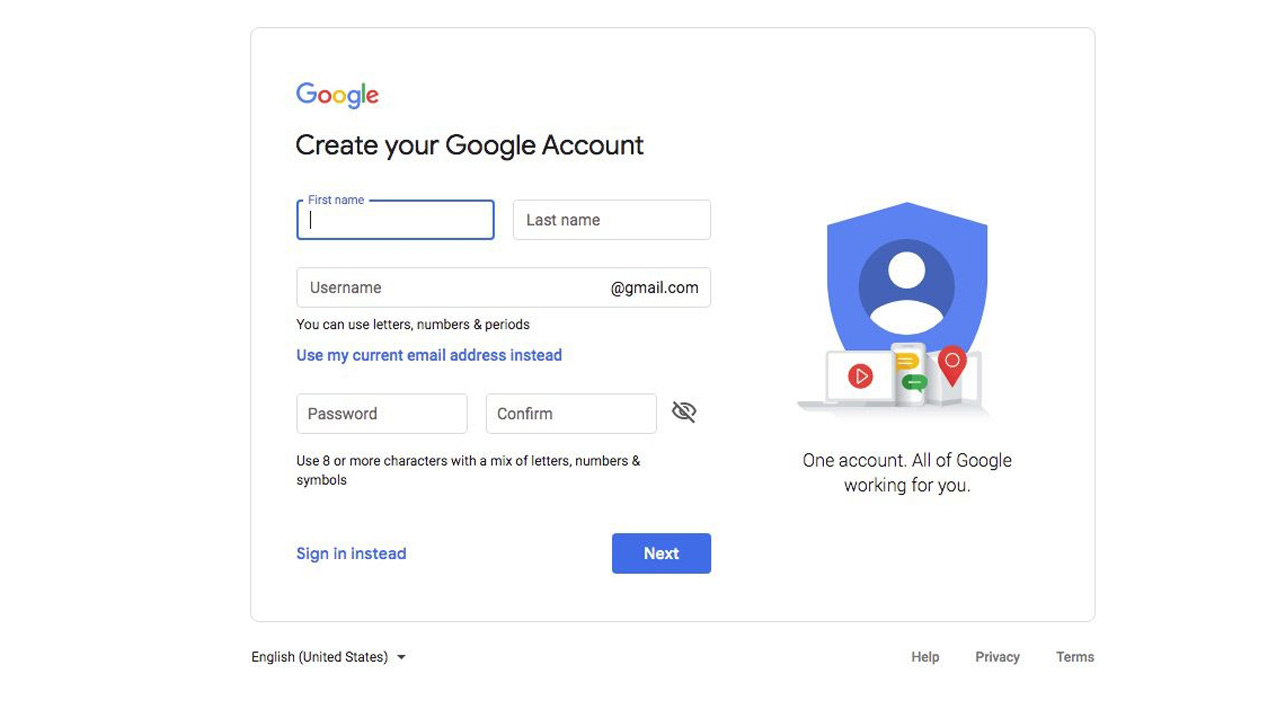
- Go to the Google Account sign-in page and click Create account.
- Select "For my personal use" or "To manage a business".
- Enter your name and create a username (e.g., yourbusinessname@gmail.com).
- Follow the prompts to add a password and, if necessary, skip the phone number verification for a free business email account.
2. 2. Set Up a Free Business Email Account via Workspace Trial
To gain a professional image, use the Google Workspace 14-day free trial, which acts as a free business email account during the evaluation period.
- Sign up for Google Workspace.
- Choose to buy a new domain or connect an existing one.
- Create your custom username (e.g., contact@yourbusiness.com).
- Follow the prompts to verify your domain ownership and set up MX records to make the Gmail free business email active.
2. 3. Customize and Secure Your New Business Gmail
Once your account is created, ensure it looks professional to customers.
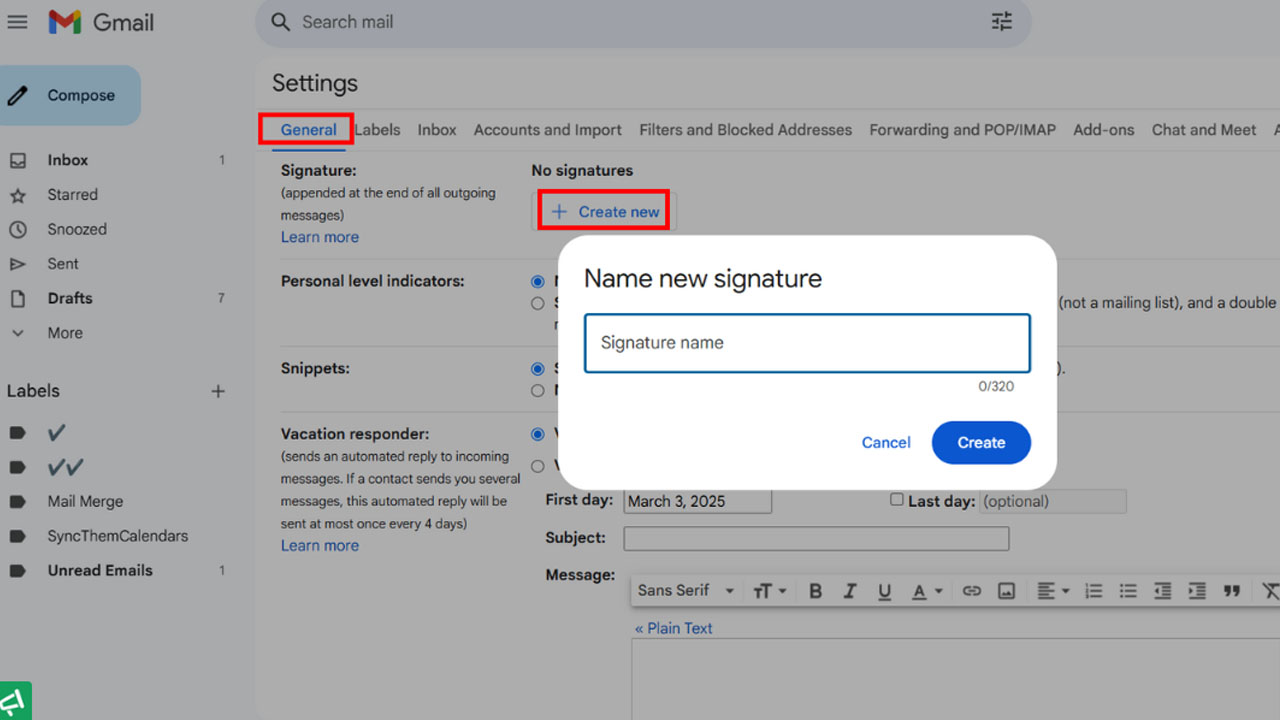
- Set up a Signature: Go to Gmail Settings > General > Signature. Add your name, title, website, and logo.
- Set up Email Forwarding: If you have an existing email, configure it to forward to your new inbox.
- Add Recovery Info: Add a recovery phone number and email address to keep your Gmail free business email secure.
Note: The free Gmail option (@gmail.com) remains free forever, while the Workspace option requires a paid subscription after the 14-day trial.
Ready to jumpstart your professional presence? Register an account at MegaAcc to manage your digital assets and explore premium Gmail options.
3. Why MegaAcc is the Best Choice for High-Quality Gmail Accounts
When searching for the best free business email solutions, MegaAcc provides the professional-grade infrastructure you need to bypass technical hurdles and start communicating with your customers immediately and reliably.
The Industry Leader in Verified Accounts
MegaAcc stands as the premier provider for businesses that need more than just a basic inbox. We specialize in delivering aged, high-quality accounts that allow you to create free business email profiles with established history.
Our platform is designed to support entrepreneurs who require robust digital assets that are ready for immediate deployment.
Uncompromising Quality Assurance
Every account we offer is a free business email account that has been Phone Verified (PVA) to ensure maximum deliverability. We provide a comprehensive replacement guarantee, so your outreach campaigns never hit a snag. This commitment to quality ensures that your Gmail free business email remains active and secure, even during high-volume usage.
Premium MegaAcc Gmail Products for Your Business Needs
To successfully deploy a business Gmail account free of typical setup restrictions, MegaAcc provides a diverse inventory of ready-to-use accounts tailored to your marketing strategies.
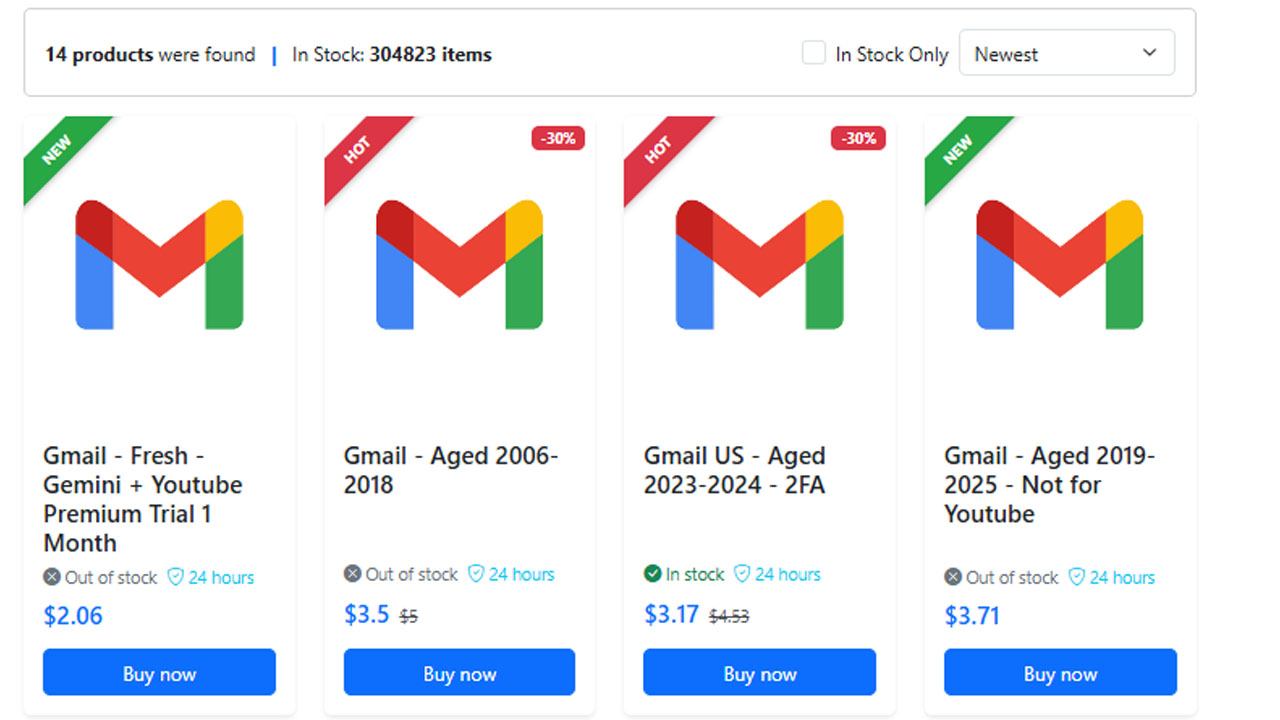
For campaigns requiring high authority and an established history, our premium aged accounts like Gmail - Aged 2006-2018 and Gmail US - Aged 200x are ideal choices.
If your operations focus on modern security and location-specific outreach, the Gmail US - Aged 2023-2024 - 2FA ensures safe and immediate access. We also offer specialized assets, including the Gmail Domain - Random IP - Read
Efficiency for Marketing Professionals
Manual account creation is a slow, tedious process often blocked by security triggers. For those looking to create a business Gmail account for free at scale, MegaAcc offers a streamlined alternative.
We provide ready-to-use accounts perfect for marketing and bulk operations, saving you hours of setup time and allowing you to focus on growth.
Proven Trust Signals and Support
We prioritize your security with encrypted payment processing and a dedicated team available for 24/7 support. Whether you want to create a Gmail business account free or manage a large fleet of assets, our experts are here to help. Explore our Gmail Account Category today to find the high-converting accounts your business deserves.
4. Common Challenges When You Create Business Gmail Account Free
Trying to create a business Gmail account for free can sometimes lead to unexpected technical roadblocks that stall your branding efforts and disrupt your daily communication.
4.1 Overcoming Verification Hurdles
One of the most frustrating parts of trying to create business Gmailaccount free of charge is the mandatory phone verification. Google often flags repeated sign-ups from the same IP address or phone number.
To ensure your free business email account stays active, you must use unique, high-quality verification methods to avoid being locked out during the setup process.
4.2Preventing Account Flags and Suspensions
New accounts are often under heavy scrutiny. If you create a Gmail business account free and immediately begin high-volume outreach, Google’s automated systems may flag the activity as spam.
Maintaining a natural "warm-up" period is essential to protecting your Gmail free business email and ensuring your messages actually land in your clients' inboxes rather than the junk folder.
4.3 Navigating Storage and Feature Limits
While you can create new Gmail account for business free, you are typically limited to the standard 15GB storage cap shared across Drive and Photos. Managing this space requires diligent cleanup.
Additionally, a free business email google account lacks some advanced administrative controls found in paid versions, making it vital to organize your folders and filters efficiently from day one.
5. Maximizing Productivity With Your Free Business Email Address
Once you successfully create a business Gmail account for free, optimizing your workflow is the next step to ensuring your professional communications remain efficient and organized.
5.1 Setting Up Professional Signatures
Adding a custom signature is a simple way to boost your brand’s authority. Even with a business Gmaill account free, you can include your logo, social media links, and contact information in every outgoing message.
This small touch ensures every recipient knows they are dealing with a legitimate professional, enhancing the impact of your free business email address.
5.2 Organizing With Labels and Filters
Keeping your inbox clutter-free is vital when you create free business email workflows for high-volume work. Gmail’s "Labels" feature allows you to categorize incoming mail by project or client, while "Filters" can automatically sort messages the moment they arrive.
This ensures your gmail free business email stays organized, effectively separating critical business leads from general notifications.
5.3 Seamless Mobile Syncing
To stay responsive, you need to be accessible everywhere. Your free business email account is fully compatible with the Gmail app on iOS and Android, offering real-time push notifications.
By syncing your free business email google account across all devices, you ensure that no important client inquiry goes unanswered, no matter where you are.
Need a reliable, aged account for your marketing campaigns? Check out our Premium Aged Gmail Accounts for instant delivery and high trust scores.
6. Frequency Asks Questions
6.1 Is a business Gmail account truly free forever?
Standard personal accounts ending in @gmail.com are free forever with 15GB of shared storage. However, a professional account with a custom domain (e.g., name@yourcompany.com) typically requires a paid Google Workspace subscription after a 14-day free trial.
6.2 Can I use my custom domain with a free Gmail account?
Directly, no; Google Workspace is required for native custom domain support. However, you can use a workaround by setting up "email forwarding" through your domain registrar to send and receive messages from your custom domain using a standard free Gmail inbox.
6.3 What are the biggest limitations of using a free account for business?
The main drawbacks include a lack of professional branding (@gmail.com vs @yourcompany.com), limited storage capacity (15GB), and the absence of administrative controls, which means you cannot manage or recover employee accounts if they leave the company.
6.4 How does a "Business" Google account differ from a personal one during setup?
When creating a free Google Account, selecting "To manage a business" allows you to turn on "business personalization". This makes it easier to set up a Google Business Profile to manage your company's visibility on Google Search and Maps.
Conclusion
Creating a business Gmail account free is a strategic move for any startup looking to balance professionalism with budget constraints. While standard accounts offer a great starting point, using verified assets can help you scale your outreach without technical delays. Whether you choose a basic setup or an aged account for authority, the right tools will ensure your brand remains reliable, organized, and ready to convert new clients.
________________________
Quick Access
- Sign In: https://megaacc.com/Identity/Account/Login
- Register: https://megaacc.com/Identity/Account/Register
- Product Categories: https://megaacc.com/
- Telegram Support: https://t.me/megaacc_bot
- Email Support: support@megaacc.com